Nearly 90% of remote-capable employees say they’d take a job that let them work from anywhere, and a growing slice of them are choosing “anywhere” to mean a national forest overlook instead of a home office. Remote work from your RV isn’t a fringe experiment anymore. It’s a documented lifestyle with real gear, real routines, and real solutions to the problems that used to make it impossible.
This guide is a systems-focused breakdown of what actually makes remote work from your RV: complete setup guide for digital nomads who love camping succeed, connectivity, power, workspace design, rig selection, and where you park. No fluff. Just the pieces you need in place before you try to hit a deadline from a dirt road.
Key Takeaways
- Connectivity is non-negotiable. You need at least two backup layers beyond your primary internet source, not just campground Wi-Fi. [6][9]
- Starlink Roam is the only widely available RV-focused satellite option as of 2026, and it works best paired with cellular hotspots rather than alone. [1][9]
- Power systems must handle 120V loads reliably, whether that’s shore power, an inverter and battery bank, or a generator. [6]
- Workspace ergonomics matter more than people expect, a wobbly dinette table won’t cut it for eight-hour workdays.
- Rig choice shapes your lifestyle, with Class A and fifth wheels favoring stationary workers and Class B vans favoring frequent movers. [6]
Why Remote Work from Your RV Is a Real Career Option in 2026
Working from a motorhome is fully viable for most laptop-based jobs today, according to 2026 remote-work RV guides, but only if three things are in place: reliable internet, stable power, and a workspace that’s actually built for work, not a fold-out table balanced on your knees. [6]
That last part trips up more people than connectivity does. A lot of first-time RV remote workers assume they’ll figure out the internet and power, then discover three weeks in that hunching over a dinette bench all day wrecks their back and their productivity. The lifestyle works when you treat your rig like an office that happens to move, not a campsite where you occasionally answer emails.
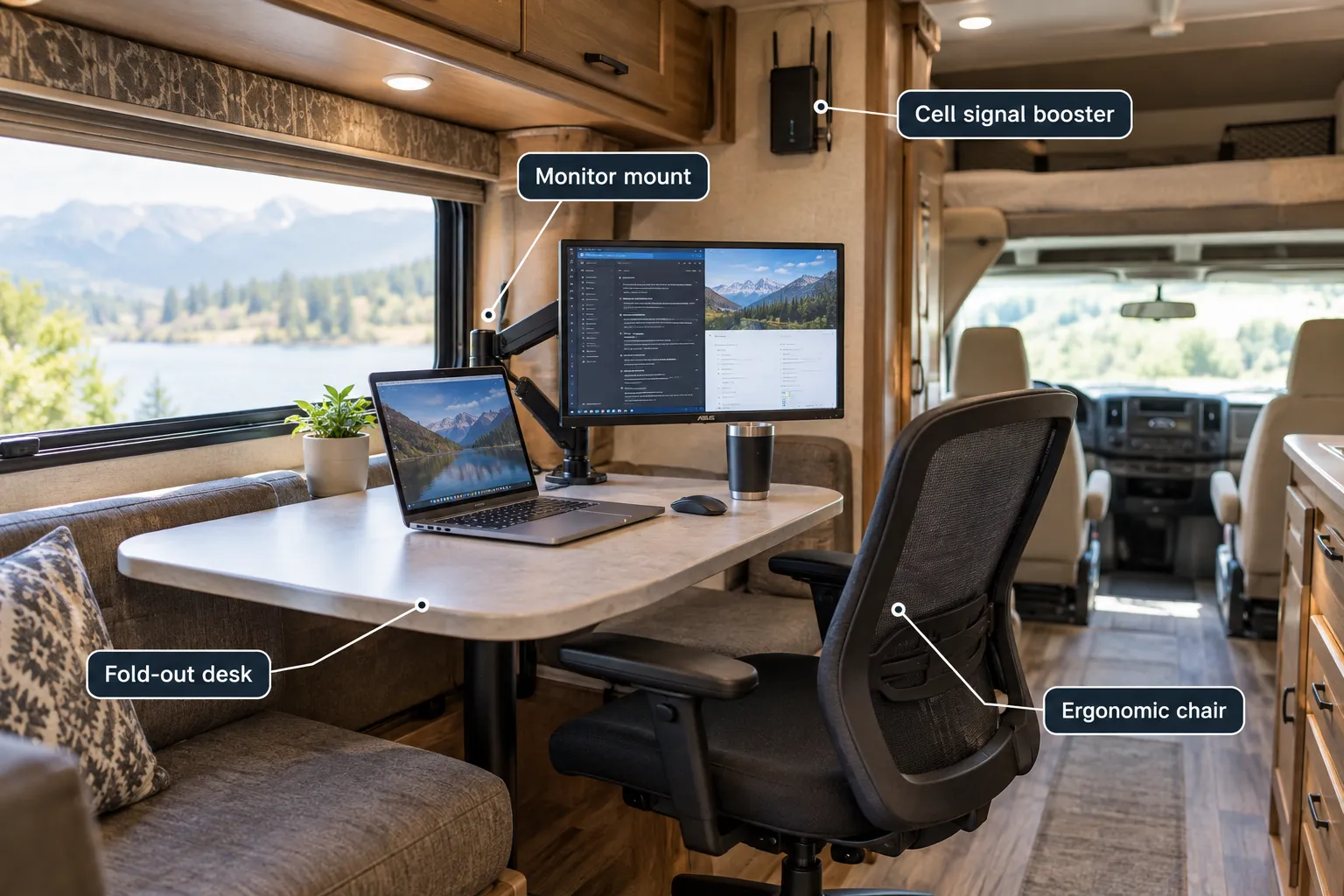
The good news: none of this requires a six-figure setup. It requires the right priorities, in the right order. Start with connectivity, because everything else, your schedule, your income, your ability to say yes to a job, depends on it.
Internet Setup for Remote Work from Your RV: Complete Setup Guide for Digital Nomads Who Love Camping
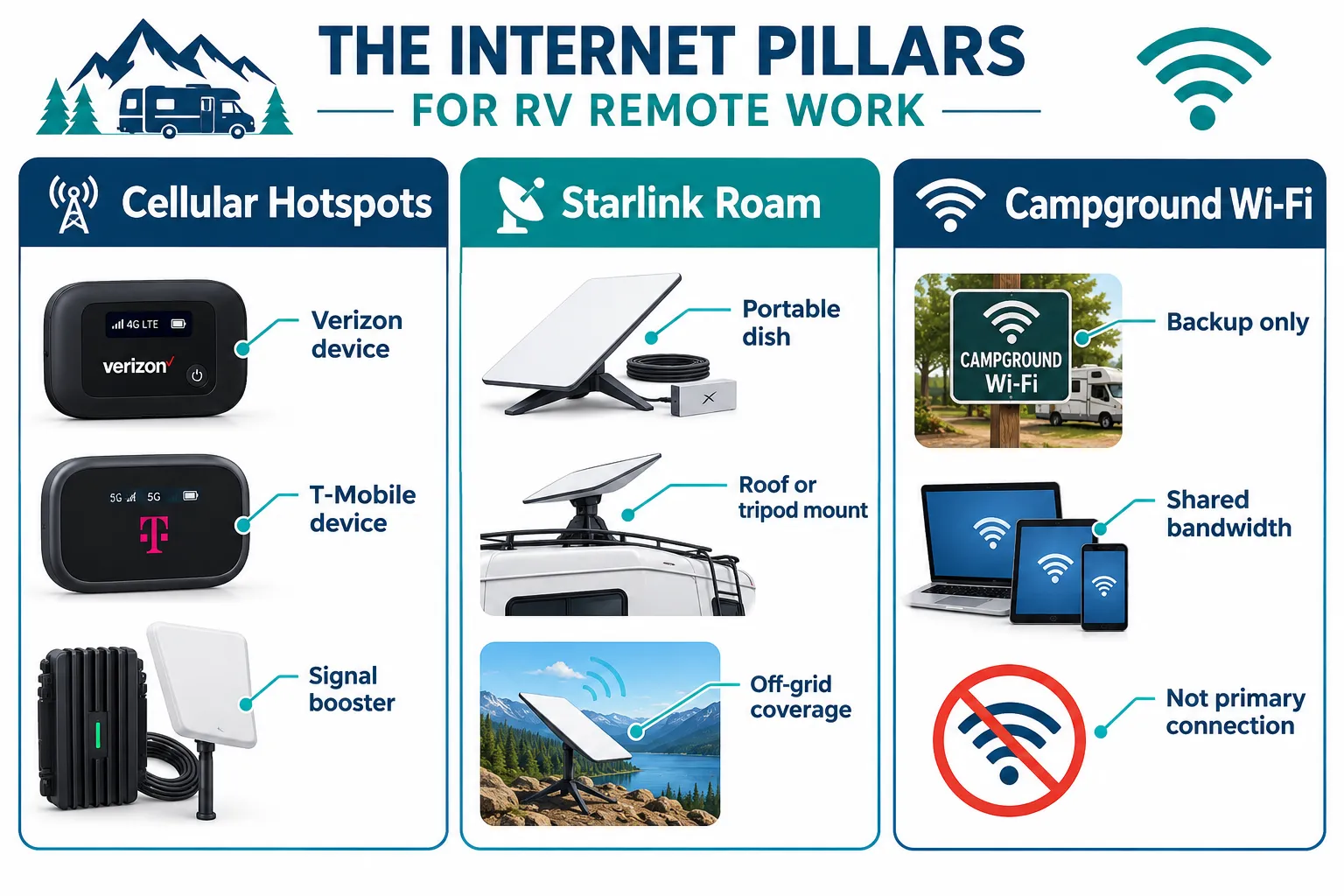
Experts who focus on RV remote work in 2026 point to three “internet pillars”: multiple cellular hotspots on different carriers, Starlink Roam satellite for off-grid coverage, and campground Wi-Fi used only as a supplement, never your main connection. [6][1][9]
Think of it like a three-legged stool. Take one leg away, and the whole thing wobbles the first time you’re out of cell range or camped somewhere with an oversubscribed satellite beam.
Cellular Hotspots: Your Everyday Connection
Cellular data is usually your fastest, cheapest, most reliable option, when you have signal. The catch is that no single carrier covers everywhere equally well, so RV remote-work manuals push a multi-carrier strategy: at least two SIMs on different networks, ideally two separate hotspots, so you’re never fully dependent on one tower grid. [6][12]
T-Mobile’s AWAY plans are a common choice among van-lifers and RVers, built specifically for travelers who need generous data without a home address tied to the account. [11] Pairing a T-Mobile device with a Verizon device covers most of the rural-to-urban spectrum you’ll encounter on a cross-country route.
Practical setup tips:
- Buy hotspots outright rather than relying on phone tethering, dedicated devices handle heat and multi-device loads better.
- Mount an external antenna or signal booster if you camp in canyons, forests, or mountain terrain often.
- Check coverage maps for your specific route before committing to a carrier combo.
Starlink Roam: Your Off-Grid Backup
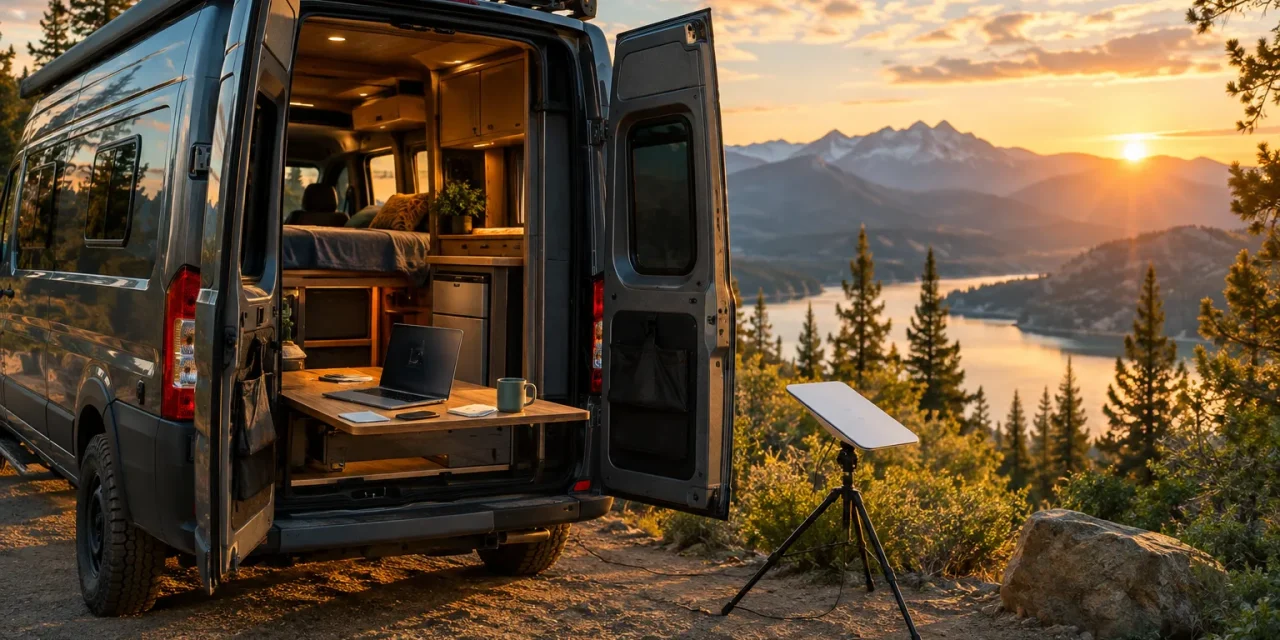
As of mid-2026, Starlink Roam is the only widely available portable satellite internet service built specifically for RV travelers in North America. [1][9] It fills the gap cellular can’t touch, remote boondocking sites, national forest dispersed camping, and anywhere else towers simply don’t reach.
Plan tiers as of late 2026 checks include entry-level options around 50-100 GB for roughly $50,$55 a month, a mid-tier around 300 GB near $80 a month, and Unlimited plans in the $165,$175 range for people who stream, video-call, or upload large files daily. [3][4][5][10] The 50 GB tier suits casual travelers, while Unlimited is really built for remote workers and content creators who can’t afford a data cap mid-meeting. [8]
Hardware options include the Standard dish (roughly $349,$499) and the smaller Mini kit (about $199,$299, with financing options near $16 a month for 12 months), drawing an active 25-40 watts of power, a number that matters a lot once you start budgeting your electrical system. [4][8][7] Setup is genuinely simple: order the hardware, pick a plan, choose a non-drill roof or hitch mount, and finish configuration in the Starlink app in a few minutes at camp. [8]
One caveat worth knowing before you buy: all Roam plans sit one network-priority tier below Starlink’s Residential service, which means speeds can dip or connections can briefly drop in congested areas compared to fixed-location users. [2][3][9] It’s rarely a dealbreaker, but it’s a reason not to schedule a live client presentation without a cellular backup running too. Roam does support travel across more than 150 countries and territories, with in-motion connectivity up to about 100 mph, so it keeps working even while you’re driving to the next stop. [7][13]
Campground Wi-Fi: Never Your Main Plan
Campground Wi-Fi is fine for checking a weather forecast or downloading a podcast. It is not fine for hosting a video call with twenty other connected devices fighting for the same bandwidth. Treat it strictly as a supplement, exactly as 2026 remote-work guides recommend. [6][1]
If you’re building out your travel gear list alongside your internet plan, browsing current RV camping gear roundups is a smart way to spot antenna mounts, booster kits, and cable organizers that keep your setup tidy instead of a tangle of wires across the dash.
Power Systems for RV Remote Work That Won’t Let You Down
A dead laptop mid-deadline is a career problem, not just an inconvenience. Remote-work RV manuals are blunt about this: consistent 120V power, through shore power, an inverter, or a generator, plus a stable work surface and decent climate control are non-negotiable for anyone working full-time from a motorhome. [6][14]
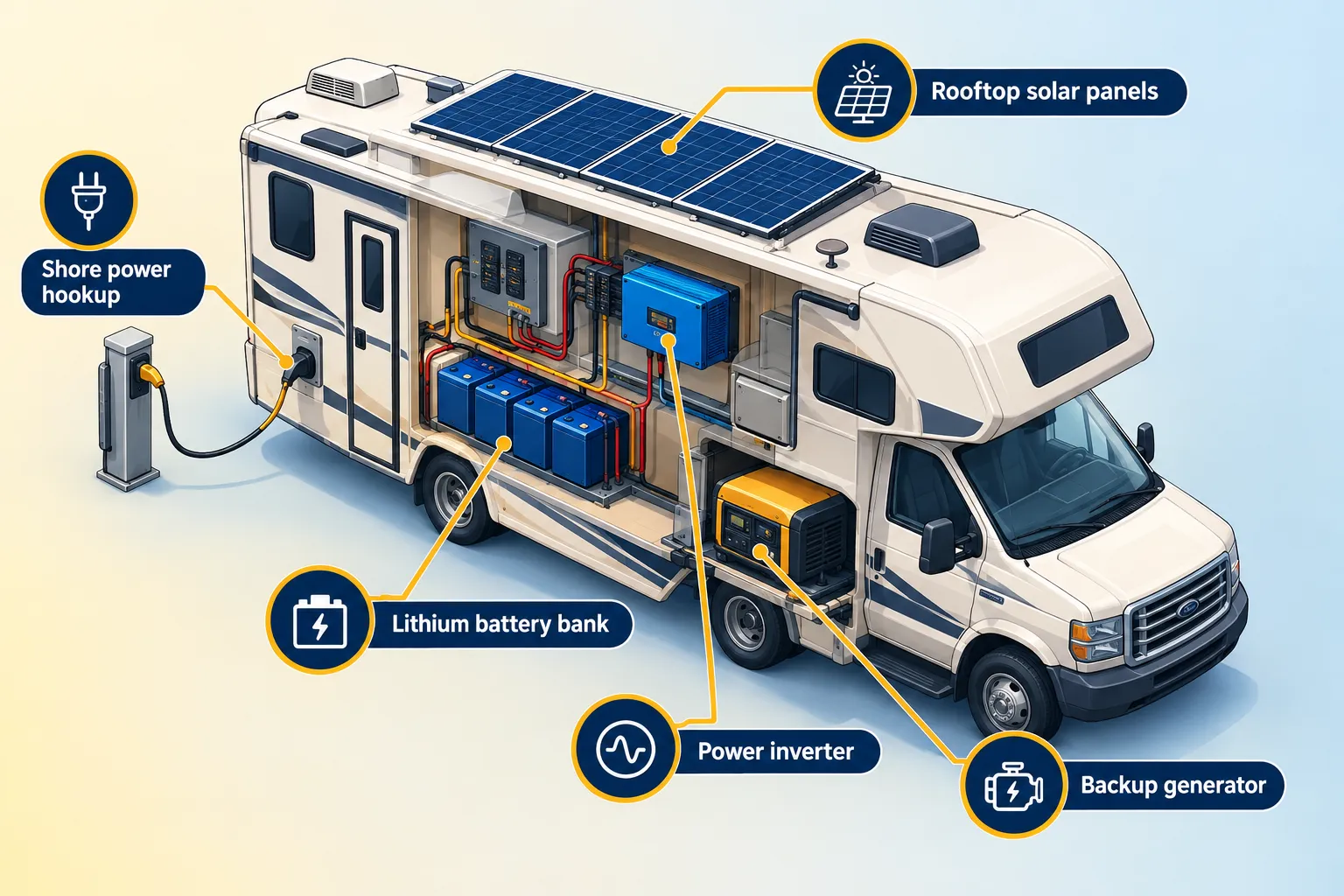
Here’s how the pieces typically fit together:
| Power Source | Best For | Watch Out For |
|---|---|---|
| Shore power (campground hookup) | Full hookup sites, long stays | Not available while boondocking |
| Solar + lithium battery bank | Boondocking, off-grid stays | Cloudy days, panel angle, battery capacity |
| Inverter generator | Backup during low sun or high draw | Noise limits at many campgrounds |
| Vehicle alternator charging | Driving days | Doesn’t replace stationary power needs |
A laptop alone sips power. The trouble starts when you add a second monitor, a Starlink dish pulling 25-40 watts continuously, a coffee maker, and climate control on a hot afternoon. [7] Run the math on your actual daily draw before you assume a small battery bank will carry you through a cloudy week.
If electrical systems feel intimidating, you’re far from alone, plenty of RVers say the same thing in our RV electrical work comfort-level poll results, and it’s worth reading before you start upgrading your setup solo. A basic understanding of amps, watts, and battery capacity goes a long way toward avoiding a mid-workday blackout.
A simple power checklist for remote workers:
- Know your daily wattage draw (laptop, monitor, Starlink, chargers, climate control).
- Size your battery bank with at least a two-day buffer for cloudy or shaded stretches.
- Keep a backup generator or extra battery pack for emergencies.
- Test your full setup at home before a long boondocking trip, not during one.
Designing a Workspace That Doesn’t Feel Like Camping
This is the piece people underestimate most. A workspace that “sort of works” for a weekend trip will grind you down over months of full-time remote work. Your body needs a real desk height, a real chair, and enough surface area for a keyboard, mouse, and maybe a second screen.
Some practical fixes that experienced RV remote workers swear by:
- A dedicated fold-down or slide-out desk instead of relying only on the dinette.
- A lightweight monitor arm that clamps to the table edge, freeing up space and improving neck posture.
- A cushioned, adjustable chair, even a compact one, rather than a bench seat built for eating, not typing.
- Blackout or reflective window coverings to cut glare and keep the rig cooler during midday work blocks.
Families juggling remote work and kids in the same rig face an extra layer of complexity, shared space, noise, and school schedules all compete for the same square footage. If that’s your situation, checking out RV bunk bed layouts kids will love can free up daytime living space by giving kids a dedicated sleeping zone that doubles as their own retreat.
Some digital nomads also build a small outdoor station for calls or focused writing when the weather cooperates. Browsing current outdoor office setup ideas is a great way to find shade canopies, portable tables, and lap desks designed for exactly this use case.
Choosing the Right Rig for This Lifestyle
Not every RV suits remote work equally, and 2026 buying guides break it down pretty clearly by how much you plan to move.
- Class A motorhomes and fifth-wheel trailers suit stationary workers who want a dedicated desk, a real office nook, and generous interior space for long stays in one spot. [6][14]
- Class C motorhomes offer a middle ground, enough room for a workspace, but still maneuverable enough to relocate every week or two.
- Class B camper vans fit digital nomads who move constantly and value being able to park almost anywhere, though workspace room is tighter. [6][14]
There’s no universally “right” answer here, it depends on how often you plan to relocate versus settle in. Someone base-camping near a national park for a month works well in a fifth wheel. Someone chasing weather and festivals across the country will feel more at home in a van.
Budgeting for the right rig (and the upgrades that come with remote work, like solar and Starlink hardware) is easier when you plan ahead. The tips in save your RV budget without sacrificing fun apply directly here, prioritize the gear that actually enables income first, then splurge on comfort extras later.
It’s also worth knowing that RV-related expenses may carry tax implications if your rig doubles as a legitimate home office or business asset. The breakdown in can an RV be deducted on your taxes is a smart read before tax season catches you off guard.
How to Pick Campgrounds and Destinations for Long Remote-Work Stays
Not every scenic spot supports a workday. Before booking a long stay, run through this checklist:
- Check cellular coverage maps for your specific carriers along the route and at the site itself.
- Confirm full hookups or a solid boondocking power plan if you’re staying more than a few days.
- Look for extended-stay discounts, many campgrounds cut weekly or monthly rates significantly.
- Scope out quiet hours and noise levels, since generators and neighboring RVs can disrupt calls.
- Balance connectivity with scenery, sometimes the perfect Instagram spot has zero bars, so plan work days around drive days accordingly.
Retro-themed and destination parks can be surprisingly good long-stay bases because they often invest in stronger amenities. 5 groovy reasons Retroville RV Park is your next Florida time machine is a good example of a park built around comfort and character, not just a pull-through spot for the night.
If boondocking and off-grid stays are more your style, browsing off the beaten path camping spots ahead of time helps you plan your Starlink and battery setup around locations that genuinely need it, rather than discovering the gap in coverage after you’ve already unhitched.
Full-time RV life isn’t always the postcard experience people expect, and burnout is real when work and travel both demand energy at once. It’s worth reading honest accounts like full-time RV life isn’t working anymore to set realistic expectations before you commit to the road full-time.
Conclusion: Your Next Steps for Remote Work from Your RV
Remote work from your RV: complete setup guide for digital nomads who love camping comes down to four systems working together, connectivity, power, workspace, and location strategy. Skip any one of them, and the whole plan gets shaky fast.
Start small and test before you commit. Run your internet setup, power system, and workspace through a two-week trial trip before quitting your lease or selling your house. Fix the weak points while the stakes are low. Then scale up to longer stays, farther routes, and the kind of freedom that made you consider this lifestyle in the first place.
The tools exist. The lifestyle works. The rest is just building your setup one deliberate decision at a time.
References
[1] Get Satellite Internet For Your Rv – https://www.satelliteinternet.com/resources/get-satellite-internet-for-your-rv/ [2] Starlink Rv Plans Pricing 2026 – https://www.starlinkrvkit.com/blog/starlink-rv-plans-pricing-2026 [3] Starlink Roam Review – https://www.satelliteinternet.com/providers/starlink/starlink-roam-review/ [4] Article 3 2065639 20260908 – https://www.mitrade.com/ae-en/insights/news/live-news/article-3-2065639-20260908 [5] What Rvers Need To Know About Starlink – https://roadtrippers.com/magazine/what-rvers-need-to-know-about-starlink/ [6] Remote Work Rv Digital – https://www.motorhomerepublic.com/blog/activities/remote-work-rv-digital [7] Starlink Internet Review For Rv – https://www.ecoflow.com/us/blog/starlink-internet-review-for-rv [8] What Is Starlink – https://www.starlinkrvkit.com/what-is-starlink [9] Internet For Rvs – https://www.highspeedinternet.com/resources/internet-for-rvs [10] Starlink – https://www.satelliteinternet.com/providers/starlink/
remote work from your RV, digital nomad RV life, RV internet setup, Starlink Roam for RVs, RV solar power system, boondocking remote work, RV office setup, mobile workspace design, full-time RV living, cellular hotspots for RVs, van life remote work, RV camping destinations